
LINE Webhook Integration
LINE Webhook Integration is a feature that lets Repro receive friend-add, block, and unblock actions on your LINE Official Account in real time and automatically sync each user’s friend status. You can enable it by setting the Webhook URL issued for each LINE channel in the LINE Developers Console.
What you can do
Real-time friend status sync: When a user adds, blocks, or unblocks your account, the change is reflected in the friend status in Repro within a few minutes.
Automatic exclusion of blocked users: Blocked users are automatically excluded from subsequent LINE deliveries. No manual import is required to update block status after you start operating with the webhook.
Note
Webhook Integration only syncs events that occur after setup is complete. Users who were already friends before setup, and block status prior to setup, are not reflected retroactively. At initial setup, import your existing user information and block status via Registering LINE User IDs to Repro (CSV/S3 import).
Webhook Integration and import can be used together.
Prerequisites
The target LINE channel has already been registered in LINE Channel Settings.
You have permission to set the Webhook URL in the LINE Developers Console.
Setting up the Webhook URL
Steps in Repro
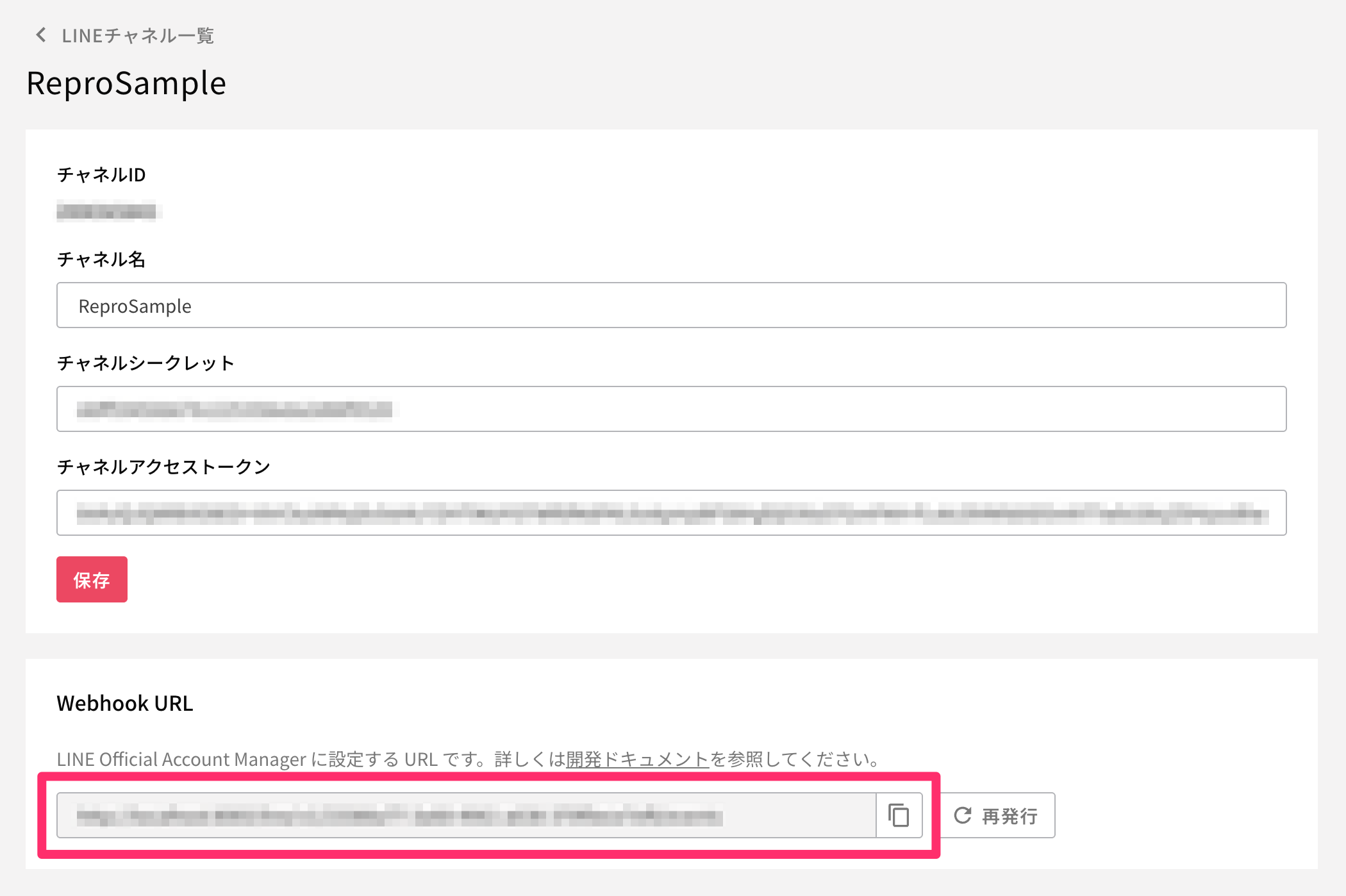
Go to [Settings] > [LINE Settings] > [LINE Channel Settings], and click ⋮ > Edit on the target channel.
In the [Webhook Settings] section of the edit screen, copy the displayed Webhook URL.
Steps in the LINE Developers Console
Open the target channel in the LINE Developers Console and select [Messaging API settings].
Paste the URL you copied in step 2 into [Webhook URL] under [Webhook settings], and update it.
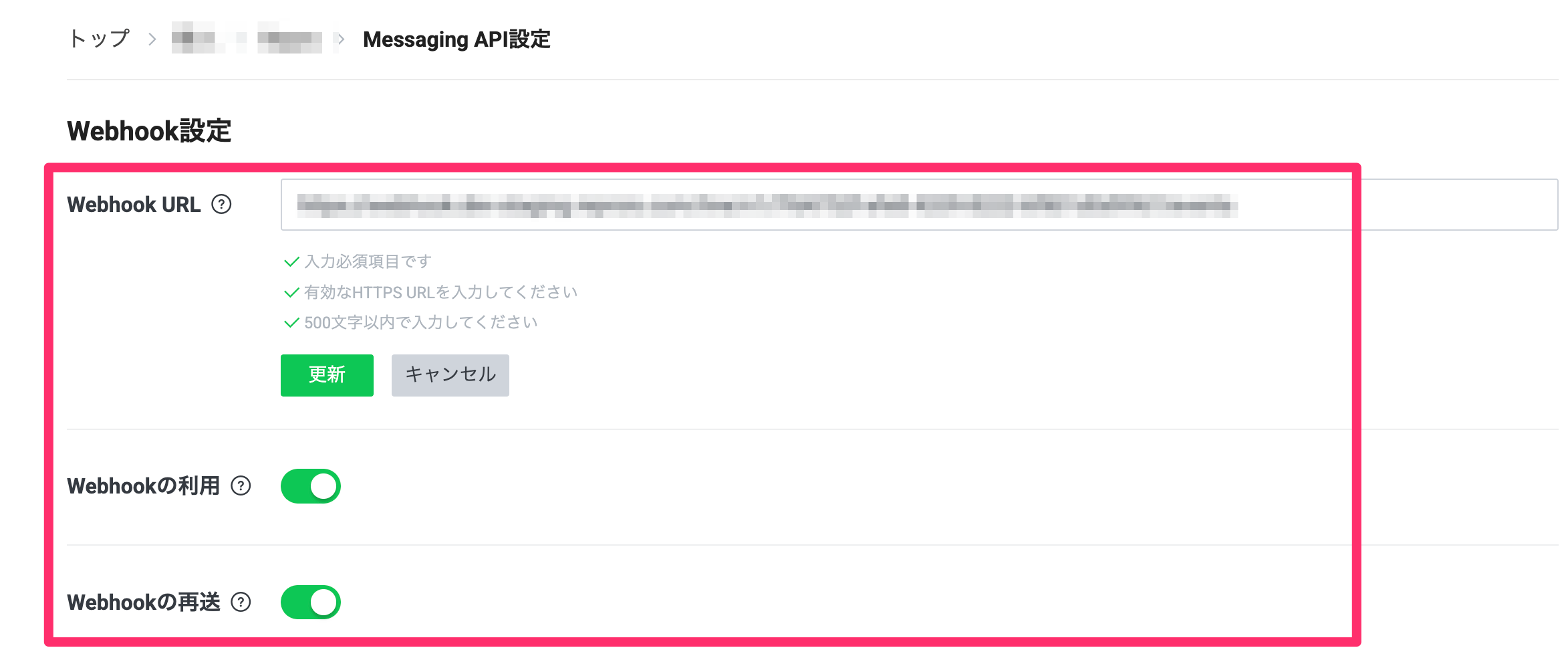
Turn on [Use webhook].
Turn on [Resend webhook].
Click [Verify] and confirm that Repro responds correctly.
Note
When [Resend webhook] is enabled, if Repro fails to receive an event due to a temporary error, LINE automatically resends the event, which helps prevent missed events.
Warning
If another Webhook URL is already set, changing it to the URL issued by Repro means the previously set URL will no longer receive webhook notifications. If you are receiving webhooks for the same channel with another tool, check the impact before changing it.
If you reissue the Channel Secret in the LINE Developers Console, update the Channel Secret to the new value in LINE Channel Settings in Repro. Until the update is reflected in Repro, signature verification fails and webhook events cannot be received.
Reissuing the Webhook URL
When you want to invalidate the URL, for example if the Webhook URL has been exposed to a third party, run [Reissue] from the [Webhook Settings] section of the edit screen.
Warning
Reissuing invalidates the previous Webhook URL. After reissuing, be sure to replace the Webhook URL in the LINE Developers Console with the new URL. Events will not be received until you replace it.
How friend status is synced
The friend status in Repro is updated as follows depending on the event that occurs on LINE.
Action on LINE |
Behavior in Repro |
|---|---|
Add friend (new) |
Automatically creates a Repro user and sets it to a deliverable state. |
Unblock (re-add) |
Restores the friend status to deliverable. |
Block |
Updates the friend status to blocked and excludes the user from subsequent LINE deliveries. |
It takes a few minutes for the status to be reflected.
You can check an individual user’s friend status (deliverable / blocked) in the LINE information on the user detail screen. Searching by LINE User ID or User ID in ID-specified Audience lets you open the detail screen for the target user.
Note
A user automatically created on friend-add via the webhook is identified only by their LINE User ID and is not linked to a User ID. If you want to link a User ID and deliver by segment, also register the User ID via the SDK or import (Format 1).
Warning
CSV/S3 import overwrites the block status updated via the webhook. If you run an import while operating with the webhook, keep the data you import (deliverable / blocked) up to date. Importing a file with stale status may overwrite block status that was updated in real time with older values.