
Email channel settings
When creating a campaign, you must specify which delivery category the email will be sent under. In Repro, these delivery categories are managed as email channels. Before you start sending emails, create the email channels you plan to use in advance.
Note
Even if you do not need to separate delivery categories, specifying an email channel is still required. When you start using email, an ‘All Users’ email channel is created in every project by default. If you do not need to separate deliveries, use the ‘All Users’ email channel.
Create email channels
Log in to the admin panel and click [Settings] > [Mail Settings] > [Email channel settings] from the side menu.
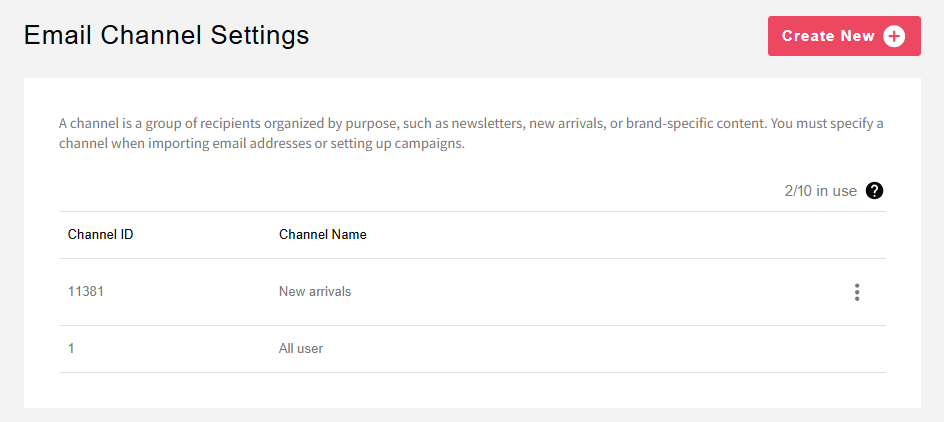
Create channels from [Create New] by category, such as coupon announcements and campaign announcements, according to the content you want to send.
All Users channel
When you start using email, the ‘All Users’ email channel is created by default. Email addresses that are already registered are stored as subscription statuses in the ‘All Users’ email channel. In addition, when you import email addresses associated with an email channel, that information is reflected in both the specified email channel and the ‘All Users’ email channel. For example, if you upload an email address CSV specifying channel A, the CSV data is reflected in both channel A and the ‘All Users’ email channel. However, this reflection to ‘All Users’ occurs only if the target user does not already have subscription information for the ‘All Users’ email channel.
Associate email addresses with email channels
If you send emails using multiple delivery categories, you need to link to Repro which users subscribe to which email channels. You can associate email addresses with email channels when uploading a CSV from the admin panel or uploading a CSV to S3. If you create a new email channel, even email addresses already registered in Repro must be re-imported with that email channel in order to be used as recipients for that channel.
For details, see Linking email addresses to Repro.
Subscribing to and unsubscribing from email channels via the SDK
You can link a user’s email channel subscriptions and unsubscriptions to Repro from the SDK API. Use this, for example, when your app provides a screen where users can select the types of email (channels) they want to receive.
Note
This API is available on the iOS SDK, Android SDK, Cocos2d-x SDK, Unity SDK, Cordova SDK, React Native SDK, Flutter SDK, and Web SDK.
Before calling the API, be sure to set the user identifier using
setUserID(). If the user ID is not set, the subscription/unsubscription will not be linked.For the channel ID, specify the channel ID shown for the target channel under [Settings] > [Email Settings] > [Email Channel Settings] as a positive integer.
The SDK does not retain the subscription state. Both the subscribe and unsubscribe APIs send an event regardless of the current subscription state. Even if you call them on a channel that is already subscribed (or unsubscribed), the state is retained and no error occurs.
Subscribing to a channel
To subscribe a user to a specified email channel, use the subscribeEmailChannel method.
// Set user ID first
[Repro setUserID:@"user123"];

// Subscribe to an email channel
[Repro subscribeEmailChannel:CHANNEL_ID];
// Set user ID first
Repro.setUserID("user123")

// Subscribe to an email channel
Repro.subscribeEmailChannel(channelID: CHANNEL_ID)
// Set user ID first
Repro.setUserID("user123");

// Subscribe to an email channel
Repro.subscribeEmailChannel(CHANNEL_ID);
// Set user ID first
Repro.setUserID("user123")

// Subscribe to an email channel
Repro.subscribeEmailChannel(CHANNEL_ID)
// Set user ID first
ReproCpp::setUserID("user123");

// Subscribe to an email channel
ReproCpp::subscribeEmailChannel(CHANNEL_ID);
// Set user ID first
Repro.SetUserID("user123");

// Subscribe to an email channel
Repro.SubscribeEmailChannel(CHANNEL_ID);
// Set user ID first
Repro.setUserID("user123");

// Subscribe to an email channel
Repro.subscribeEmailChannel(CHANNEL_ID);
// Set user ID first
Repro.setUserID("user123");

// Subscribe to an email channel
Repro.subscribeEmailChannel(CHANNEL_ID);
// Set user ID first
await Repro.setUserID("user123");

// Subscribe to an email channel
await Repro.subscribeEmailChannel(CHANNEL_ID);
repro.subscribeEmailChannel(CHANNEL_ID);
Repro.subscribeEmailChannel(CHANNEL_ID);
// Set user ID first
reproio('setUserID', 'user123');

// Subscribe to an email channel
reproio('subscribeEmailChannel', CHANNEL_ID);
Unsubscribing from a channel
To unsubscribe a user from a specified email channel, use the unsubscribeEmailChannel method.
[Repro unsubscribeEmailChannel:CHANNEL_ID];
Repro.unsubscribeEmailChannel(channelID: CHANNEL_ID)
Repro.unsubscribeEmailChannel(CHANNEL_ID);
Repro.unsubscribeEmailChannel(CHANNEL_ID)
ReproCpp::unsubscribeEmailChannel(CHANNEL_ID);
Repro.UnsubscribeEmailChannel(CHANNEL_ID);
Repro.unsubscribeEmailChannel(CHANNEL_ID);
Repro.unsubscribeEmailChannel(CHANNEL_ID);
await Repro.unsubscribeEmailChannel(CHANNEL_ID);
repro.unsubscribeEmailChannel(CHANNEL_ID);
Repro.unsubscribeEmailChannel(CHANNEL_ID);
reproio('unsubscribeEmailChannel', CHANNEL_ID);
Note
Unsubscribing from a specific channel does not unsubscribe the user from the ‘All Users’ channel. To unsubscribe from the ‘All Users’ channel, specify that channel’s channel ID.
Selecting an email channel for a campaign
When creating an email campaign, specify the email channel to use for sending. Only users subscribed to the selected email channel are eligible for delivery. For details, see Creating an email campaign.
FAQ
Can I specify which email channel an email address is associated with when registering an email address from the SDK?
No. When an email address is registered, it is associated with the ‘All Users’ email channel. If you want to additionally associate it with another email channel, use CSV upload from the admin panel or upload via S3. Note that the iOS SDK, Android SDK, and Web SDK provide an API for specifying which channels a user subscribes to or unsubscribes from. For details, see Subscribing to and unsubscribing from email channels via the SDK.